You hand someone a business card at a networking event. They smile, slip it into their pocket, and you never hear from them again. The card ends up buried under a stack of papers, tossed in a drawer, or thrown away entirely. Sound familiar?
vCard QR codes solve this problem by letting people save your contact information directly to their phone with a single scan. No typing, no lost cards. But most vCard QR code generators create static codes that come with a serious limitation: once the data is embedded, you cannot change it. If your phone number or job title changes, you need to generate an entirely new QR code and reprint everything.
Codex QR Cloud takes a different approach. It creates dynamic vCard QR codes that point to an auto-generated, professional contact landing page. You can update your details at any time without ever reprinting the QR code. And the best part? It is completely free to get started.
The Problem with Static vCard QR Codes
A static vCard QR code works by encoding your contact information directly into the QR pattern itself. Your name, phone number, email address, and other fields are all baked into the image. When someone scans it, their phone reads the data and offers to save it as a new contact.
This approach has several drawbacks:
- No updates: If you change your phone number, email, or job title, the old QR code still shows the outdated information. You must generate a new code and replace it everywhere it was printed.
- No analytics: You have no way of knowing whether anyone actually scanned your QR code. Did that conference badge generate any leads? You will never know.
- Data density limits: The more contact fields you add, the denser and harder to scan the QR code becomes. Adding a full address, multiple phone numbers, and a website URL can push a static vCard QR to its limits.
- No branding: A static vCard QR just triggers a raw contact save prompt on the phone. There is no visual experience, no branding, and no context for the person scanning it.
For anyone who uses QR codes on printed materials like business cards, brochures, lanyards, or signage, these limitations are a real headache.
Dynamic vCard QR Codes — The Better Way
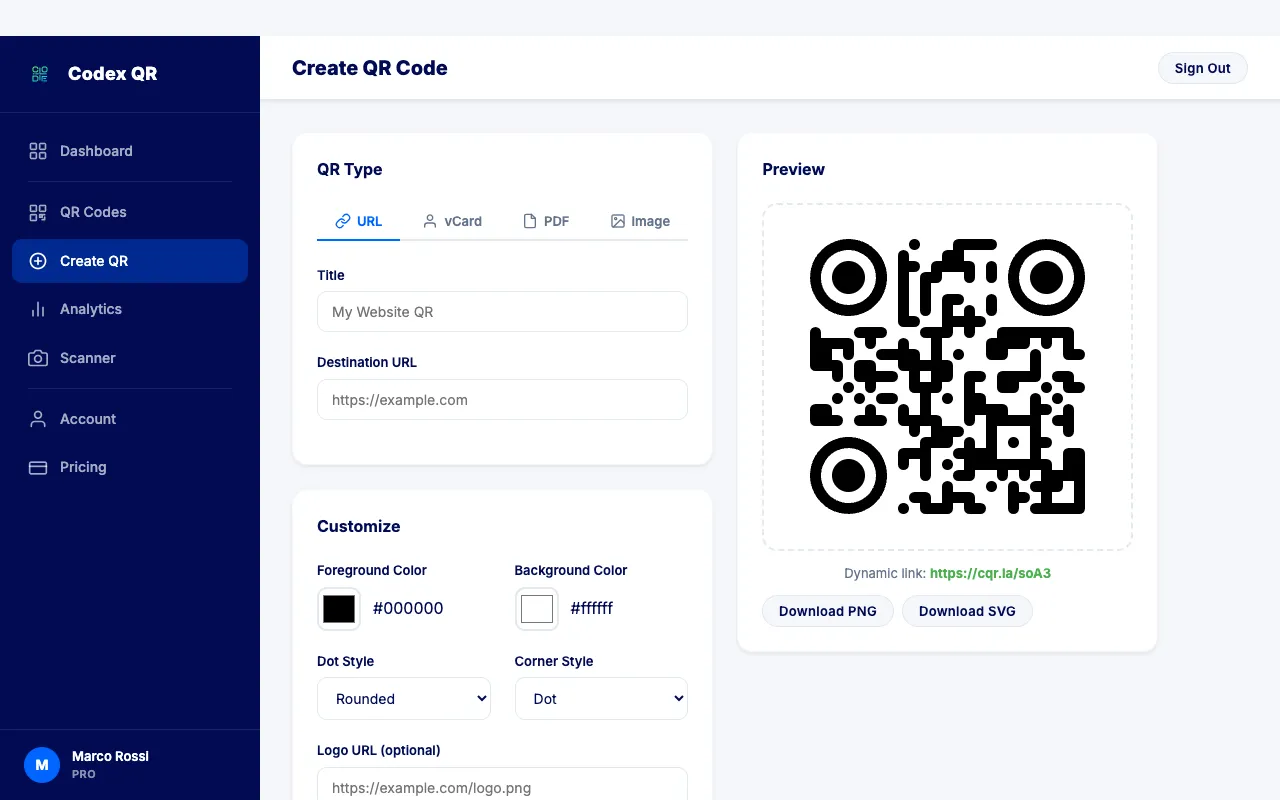
A dynamic vCard QR code works differently. Instead of embedding your contact data directly, the QR code contains a short redirect URL managed by Codex QR Cloud. When someone scans it, they are taken to a beautifully designed contact landing page that displays all your information.
Here is what that landing page includes:
- Your name and organization displayed prominently at the top
- Avatar or initials rendered in a clean, circular design
- Phone number that is clickable to call directly from the page
- Email address linked to open the default email client
- Website link that visitors can tap to visit your site
- "Save Contact" button that downloads a standard .vcf file to the visitor's phone, adding you to their contacts in one tap
- "Call" button for instant one-tap calling
Because the QR code points to a URL rather than storing data directly, you can update your contact details at any time from your Codex QR Cloud dashboard. The QR code itself never changes. Print it once on your business cards, and it stays valid no matter how many times you update your information behind it.
How to Create a Dynamic vCard QR Code
Creating your first dynamic vCard QR code in Codex QR Cloud takes less than two minutes. Here is the step-by-step process:
Step 1: Sign Up for Free
Go to app.codexqr.com and create a free account. No credit card is required. The free plan includes up to 5 dynamic QR codes with full analytics and landing pages.
Step 2: Choose vCard Type
From your dashboard, click "Create QR" and you will see the type selector. Choose "vCard" from the list of available QR code types. This tells Codex QR Cloud that you want to create a contact card with an auto-generated landing page.
Step 3: Enter Your Contact Details
Fill in the contact form with your information:
- First Name and Last Name
- Phone Number (mobile, work, or both)
- Email Address
- Organization / Company
- Job Title
- Website URL
Every field is optional, so you can share as much or as little as you want. You can always come back and add more details later.
Step 4: Save and Share
Click "Save" and your dynamic vCard QR code is live immediately. Download the QR code image to print on business cards, add to your email signature, or display at your booth. When anyone scans it, they will see your professional contact landing page with all the details you entered.
Your Auto-Generated Landing Page
One of the most powerful features of Codex QR Cloud's vCard QR codes is the automatic landing page that is generated for every contact card. Unlike static vCard QR codes that simply trigger a raw contact-save dialog, your dynamic vCard QR opens a polished, branded web page.
The landing page features a clean, modern design with your initials or avatar displayed in a circular badge at the top. Below that, your name and organization are shown in a clear hierarchy. All of your contact details are listed with appropriate icons, and each one is interactive: phone numbers can be tapped to call, email addresses open the mail client, and website links navigate directly.
Two prominent action buttons sit below your contact information. The "Save Contact" button generates and downloads a .vcf file, which is the universal standard for digital contact cards. When the visitor taps it, their phone immediately offers to add you as a new contact with all your details pre-filled. The "Call" button initiates a phone call with a single tap.
The landing page is fully responsive and looks great on every device, from the latest smartphones to tablets and desktop browsers. It loads fast, requires no app installation, and works on both iOS and Android. There is nothing for the person scanning your QR code to install or configure. They scan, they see your info, they save your contact. It is that simple.
Use Cases for Dynamic vCard QR Codes
Dynamic vCard QR codes are versatile and fit into many professional and personal scenarios:
Networking Events and Conferences
Print your vCard QR code on your conference badge or lanyard. Instead of fumbling with stacks of paper business cards, let people scan and save your contact instantly. You will also see scan analytics, so you know exactly how many connections you made.
Business Cards
Add a vCard QR code to the back of your traditional business card. Even if the physical card gets lost, anyone who scanned it already has your information saved in their phone. And if you change roles or phone numbers, the QR code still works with the updated details.
Email Signatures
Include your vCard QR code image in your email signature. Recipients can scan it right from their screen or click through to your contact landing page.
Trade Shows and Exhibitions
Display a large vCard QR code at your booth. Visitors can scan from a distance and save your sales team's contact information without waiting in line for a physical card.
Employee Badges and ID Cards
Issue dynamic vCard QR codes on employee badges. When team members change departments, titles, or phone extensions, simply update the information in the dashboard rather than reprinting badges.
Real Estate Agents
Print your vCard QR on property flyers, yard signs, and open house materials. Prospective buyers can save your contact in seconds, and you can track which properties generate the most interest based on scan analytics.
Free vs. Competitors
Most QR code platforms charge monthly fees for dynamic vCard QR codes, if they offer the feature at all. Here is how Codex QR Cloud compares:
- Codex QR Cloud: Free tier includes 5 dynamic QR codes with auto-generated landing pages, scan analytics, and unlimited updates. No credit card required.
- QR Code Monkey: Generates static QR codes only. No dynamic vCard option, no landing pages, no analytics.
- QR Tiger: Dynamic vCard QR codes start at $7 per month. Landing page customization requires a higher-tier plan.
- Beaconstac: Digital business cards start at $5 per month per user. Annual billing required for the best price.
With Codex QR Cloud, you get dynamic vCard QR codes with professional landing pages at no cost. For most professionals and small businesses, the free plan is more than enough to cover all their networking needs.
Create Your vCard QR Code — Free
Generate a dynamic vCard QR code with an auto-generated contact landing page. Update your info anytime. No credit card required.
Create vCard QR Sign Up Free