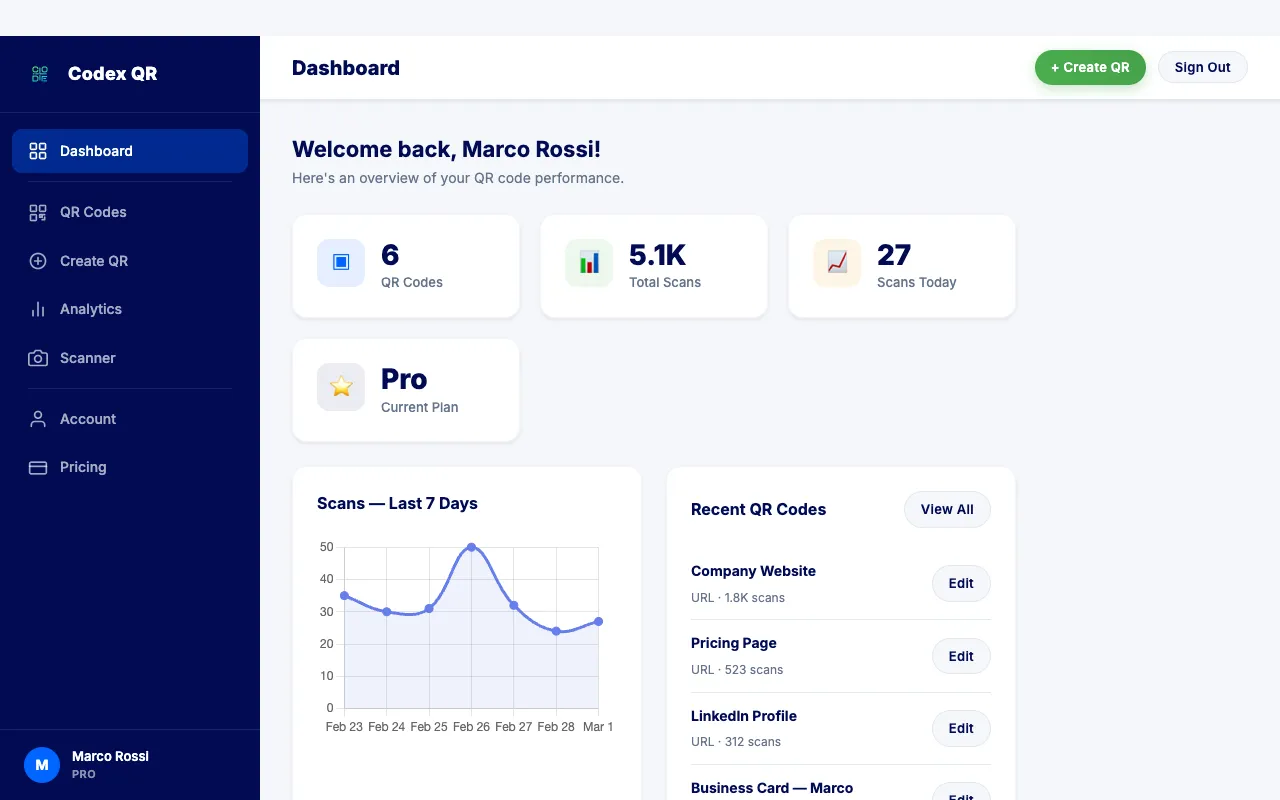
Today we are launching Codex QR Cloud -- a full cloud platform for creating, managing, and tracking dynamic QR codes from any browser. Whether you are running a marketing campaign, sharing restaurant menus, or distributing digital business cards, Codex QR Cloud gives you the tools to create QR codes that you can update anytime and track every single scan in real time. The best part: you can start for free with no credit card required.
What Are Dynamic QR Codes?
Before diving into the platform, it helps to understand the difference between the two fundamental types of QR codes.
A static QR code encodes data directly into its pattern. Once generated, the destination is permanently fixed. If you print a static QR code pointing to https://example.com/menu and later need to change that URL, you have to generate and print an entirely new code. Static QR codes are reliable and work forever without any server dependency, but they offer zero flexibility after creation.
A dynamic QR code works differently. Instead of embedding the final destination directly, it encodes a short redirect URL. When someone scans the code, the request passes through a server that redirects to your actual destination. This architecture unlocks two critical capabilities:
- Editable destinations -- Change where your QR code points at any time without reprinting
- Scan analytics -- Track every scan with detailed data about who scanned, when, where, and on what device
Dynamic QR codes are essential for campaigns, events, product packaging, and any scenario where you need to measure engagement or update content after printing.
Introducing Codex QR Cloud
For years, Codex QR has been trusted by thousands of users as a powerful desktop application for generating and scanning QR codes on Windows and macOS. Now, we are expanding that foundation into a full cloud platform that brings dynamic QR code management to any device with a web browser.
Codex QR Cloud lets you create dynamic QR codes, customize their appearance, change their destination on the fly, and monitor scan activity through a dedicated dashboard. Everything is managed from app.codexqr.com, accessible on desktop, tablet, and mobile.
The dashboard gives you an at-a-glance view of your QR codes, total scans, recent activity, and performance trends. You can drill into any individual QR code to see its full scan history, edit its destination, or download the code in high resolution.
Free Plan -- No Credit Card Required
We believe everyone should have access to dynamic QR codes, not just enterprises with large budgets. That is why Codex QR Cloud includes a generous free tier that covers the needs of most individuals and small businesses:
- 5 dynamic QR codes -- Enough for your website, social media, menu, business card, and one more
- 1,000 scans per month -- More than sufficient for local businesses and personal projects
- 7-day analytics -- View scan data from the past week including location, device, and time
- Basic QR customization -- Custom colors, shapes, and branding options
- 2 MB file upload -- Host PDFs or images directly through your QR code
There are no trials that expire and no credit card on file. Start for free and upgrade only when your needs grow beyond what the free plan offers.
Create Your First Dynamic QR Code
Getting started takes less than two minutes. Here is the step-by-step process:
Step 1: Sign Up
Go to app.codexqr.com and create an account with your Google account or email address. No credit card required.
Step 2: Click "Create QR"
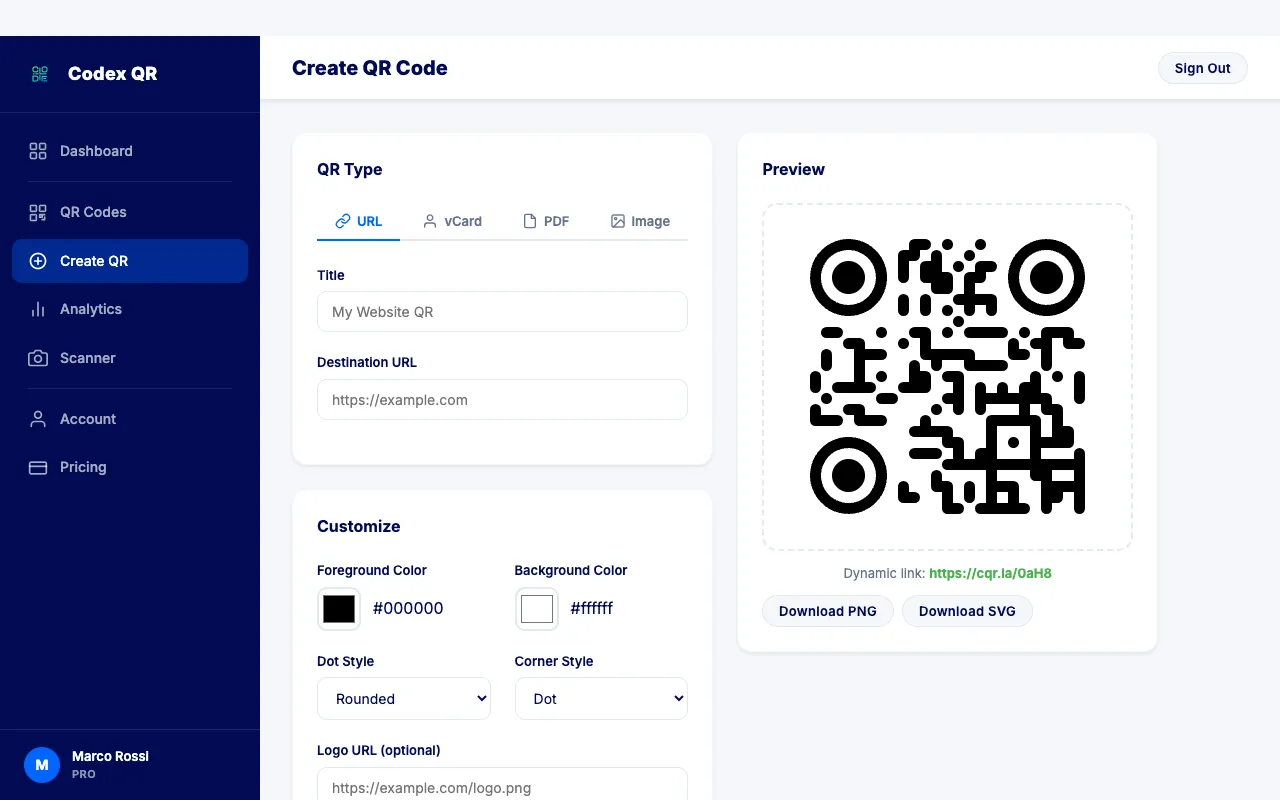
From the dashboard, click the Create QR button. You will be taken to the QR code builder where you choose your code type and enter your data.
Step 3: Choose Your QR Code Type
Select the type of QR code you want to create: URL, vCard, PDF, or Image. Each type has a tailored input form designed for that specific use case.
Step 4: Enter Your Data and Customize
Fill in the destination URL, contact information, or upload your file. Then customize the appearance of your QR code with custom colors and styling options to match your brand.
Step 5: Save and Share
Click Save and your dynamic QR code is live. Download the image, print it, or share it digitally. Your QR code starts tracking scans immediately -- every scan from this point forward is recorded with full analytics.
Real-Time Analytics
Knowing how many people scanned your QR code is useful. Knowing who, when, where, and how they scanned it is powerful. Codex QR Cloud provides detailed scan analytics so you can make data-driven decisions about your campaigns and content.
Here is what you can track for every dynamic QR code:
- Total scans over time -- View scan trends by day, week, or month with interactive charts
- Device breakdown -- See how many scans came from mobile devices versus desktops
- Geographic location -- Identify the cities and countries where your QR codes are being scanned
- Browser and OS -- Understand which browsers and operating systems your audience uses
- Time of day patterns -- Discover peak scanning hours to optimize your campaign timing
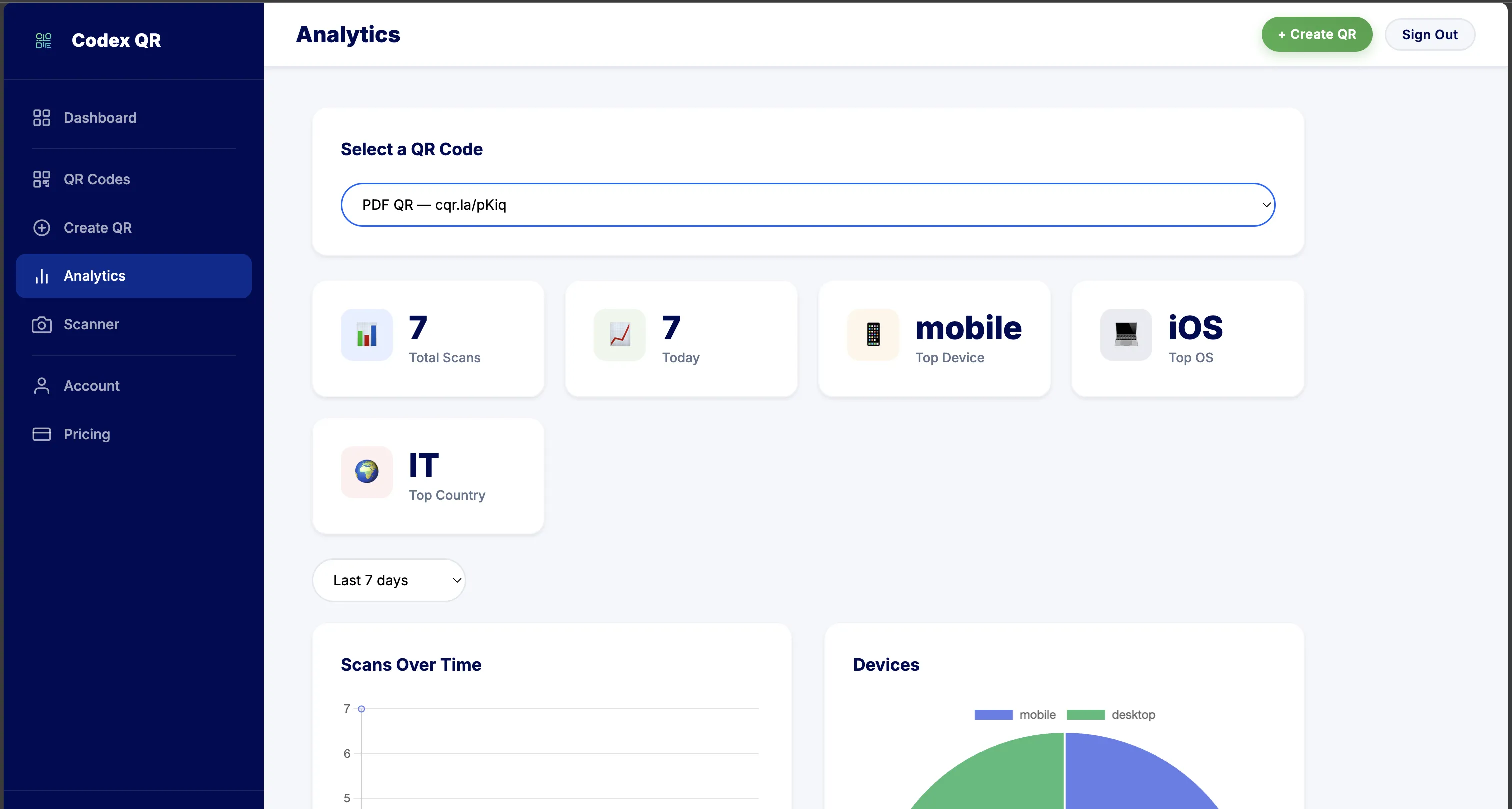
Analytics data is displayed in a clean, visual dashboard that makes it easy to spot trends and measure performance at a glance. For paid plans, analytics history extends to 30 days, 90 days, or unlimited depending on your tier.
Supported QR Code Types
Codex QR Cloud supports four dynamic QR code types at launch, each optimized for its specific use case:
- URL -- The most versatile type. Point your QR code to any website, landing page, form, or online resource. Change the destination anytime without reprinting the code.
- vCard -- Share your professional contact information. When scanned, Codex QR Cloud automatically generates a beautiful contact landing page with your name, phone, email, company, and social links. The recipient can save your details directly to their phone contacts.
- PDF -- Upload a PDF document (up to 2 MB on the free plan) and Codex QR Cloud hosts it with a built-in file viewer. Perfect for menus, brochures, product sheets, and event programs. Update the file at any time.
- Image -- Upload an image file and share it through a hosted viewer page. Ideal for sharing portfolio pieces, promotional graphics, or photo galleries through printed materials.
How Codex QR Cloud Compares
Most dynamic QR code platforms charge monthly fees even for basic functionality. Codex QR Cloud offers a genuinely free tier that outperforms many paid alternatives. Here is how it stacks up:
| Feature | Codex QR Cloud (Free) | QR Tiger ($7/mo) | Beaconstac ($5/mo) |
|---|---|---|---|
| Dynamic QR Codes | 5 | 3 | 2 |
| Scans / Month | 1,000 | 500 | 5,000 |
| Scan Analytics | Yes | Yes | Yes |
| Price | Free forever | $7/mo | $5/mo |
With 5 dynamic QR codes and 1,000 scans per month at no cost, Codex QR Cloud delivers more value on its free plan than most competitors offer on their entry-level paid tiers.
Start Creating Dynamic QR Codes -- Free
No credit card required. Create up to 5 dynamic QR codes with real-time analytics.
Start Free View Plans